Changelog

Follow new updates and improvements to AfterCut.

April 10th, 2026

Manual zoom improvements

Manual zoom operations are finally easy to do. Just add a Zoom section to the timeline, switch it to manual, and see a new interface for focusing the zoom lens.

The UI for automatic and manual zoom was improved. Confusing zoom points of interest were removed from the interface.

Timeline display updates

Small, barely noticeable update to the timeline editor. Removed the horizontal line separating time marks from the clip chunks on the timeline.

Changelog preview window

Adjusted up some padding to make it look better

Bugfixes

  • Export pipeline stalls. Sometimes, the rendering pipeline could stall and require you to cancel the export and start it again. This is now fixed.

April 5th, 2026

New

Improved

Fixed

New creative tools, a redesigned interface, and an export engine rebuilt from the ground up. As always, most of this came from watching how you use AfterCut and what you kept asking for. Thank you - keep the feedback coming.

New: Blur & Redact Sensitive Content

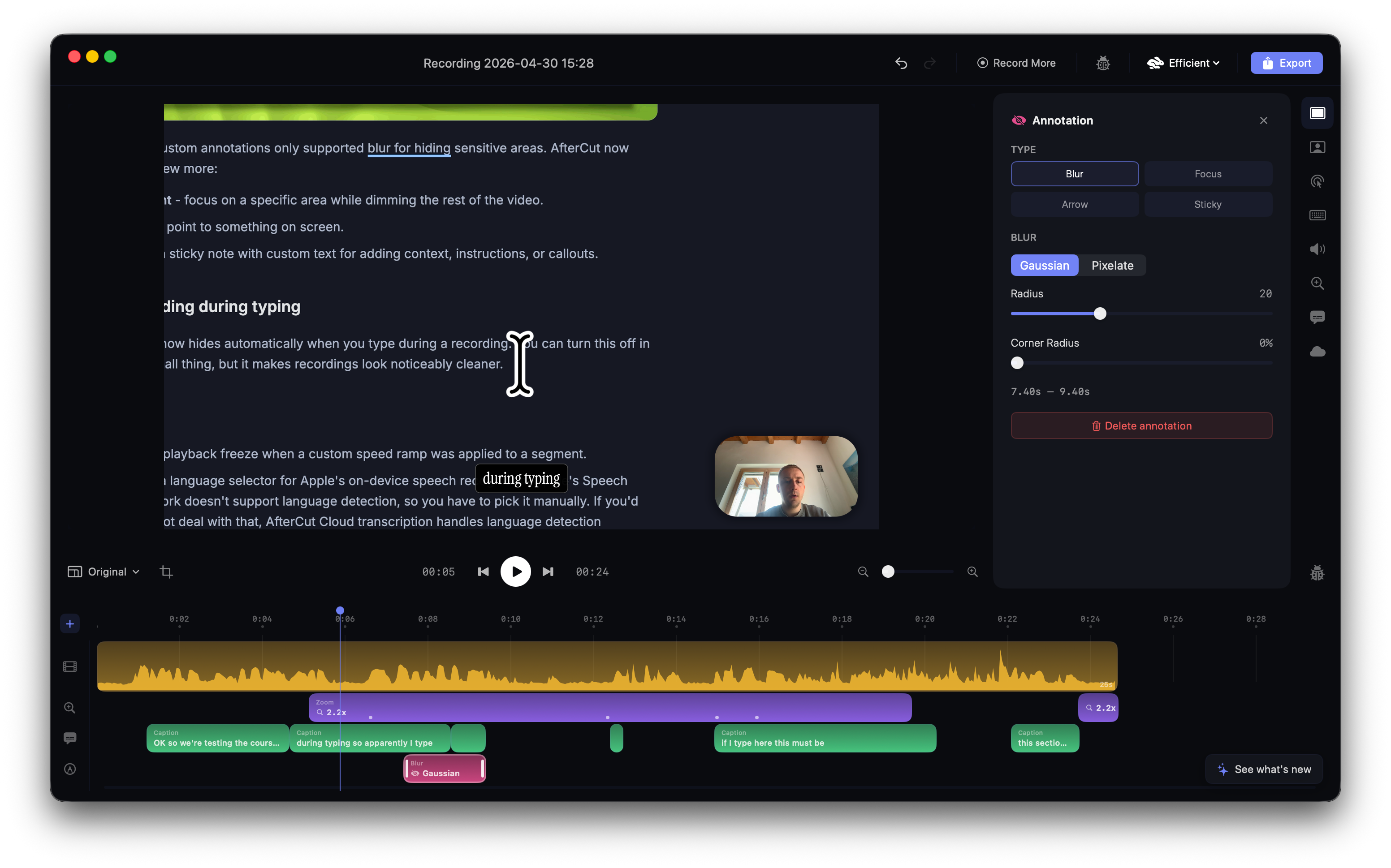
You can now draw blur or pixelate regions directly on your video to hide passwords, emails, API keys, or anything you don't want viewers to see. Add annotations from the timeline, drag them to position, resize from the corners, and adjust the blur intensity, gaussian or pixelate, your pick. They're time-bound, so the blur only appears when you need it.

New: Custom captions style

Captions got a complete overhaul. Choose from cool built-in design presets: Classic, Minimal, Confident, Warm, Calm, Elegant, Dramatic, Playful, Raw, Whimsical - each with its own font, colors, and feel. Or build your own: pick from 12 bundled fonts, set text color, background pill, corner radius, padding, position, and active word highlighting.

The new word-by-word progressive animation reveals each word as it's spoken, with configurable speed and easing. You can also duplicate and customize any preset.

New: Cloud Transcription

On top of Apple's built-in speech recognition, there's now an AfterCut Cloud transcription option. Better accuracy, especially for technical content. Your audio is processed in real time and not stored.

Available with a valid license.

New: What's New Badge

A small "See what's new" badge now appears in the editor when there's a fresh update. Click it to see the changelog without leaving the app.

Faster Exports

The entire export pipeline has been rebuilt from scratch. Frames now render in parallel across multiple workers using Metal GPU acceleration β€” 2 to 6 render threads depending on your hardware and resolution. Decode, render, and write phases all overlap instead of running one at a time. On a MacBook Pro, expect noticeably shorter export times, especially at higher resolutions.

Better Motion Blur

Motion blur rendering has been improved and now runs through Metal compute shaders. Smoother, more natural-looking blur during fast pan movements with less memory overhead.

Redesigned Interface

The entire UI has been refreshed with a new dark theme built for color accuracy. True neutral backgrounds so your video colors look right. The project library now groups recordings by date (Today, Yesterday, This Week…) and has a cleaner two-column layout.

The editor sidebar, timeline, toolbar, and export overlay have all been tightened up.

Better Performance on Low-Powered Devices

Capture priority has been tuned so the app runs smoother on base-model MacBooks and older machines. Less frame dropping during recording, and hopefully less system kills of the recording

Fixes

  • Crash on open is gone. A bug in the project library caused a crash on launch for some users. Fixed.

  • No more crash without audio tracks. Opening a project with no microphone audio no longer crashes the transcription engine.

  • App hangs resolved. Several deadlocks in the camera and panel code that caused the app to freeze have been fixed.

  • Cut segments reopen properly. Projects with video cuts now load correctly when reopened.

  • Caption timing stays in sync after cuts. Captions now correctly remap their timing when you cut or rearrange video segments.

  • Caption rendering is sharper. Improved text rendering with better font caching and shadow handling.

March 19th, 2026

Improved

Fixed

This update is packed with improvements that came directly from you - our early users who've been recording tutorials, demos, and walkthroughs every day. Your bug reports, ideas, and feedback shaped every single item on this list. Thank you for helping us make AfterCut better.

New: Pause & Resume Recording

You can now pause your recording and pick back up whenever you're ready β€” no need to start over. The final video is seamless with no gaps. Look for the new pause button in the recording overlay.

New: Movable Recording Overlay

The recording timer badge was stuck at the top of the screen, sometimes covering important UI. Now you can drag it wherever you want.

New: Disable Auto-Captions

Not everyone needs subtitles. There's now a toggle in the Captions tab to turn off automatic transcription when opening a project.

New: Video Duration in Project Library

Each project card now shows the recording length so you can quickly find the clip you're looking for.

Fixes

  • Export cancel actually cancels now. Previously, clicking Cancel during export didn't do anything β€” the export kept going. Fixed.

  • Re-exporting to the same file works. No more errors when overwriting a previous export.

  • Deleted zooms and captions stay deleted. They used to come back when you reopened the project. Not anymore.

  • Playhead jumps to the right spot after cutting. When you cut (C) and delete (X), the playhead now snaps to the edit point so you can hit spacebar and keep going.

  • The audio waveform is no longer flat on long recordings. Mic waveform is the primary one when available. Mic audio is shown by default. If you recorded with a microphone, the waveform now shows your voice instead of silent system audio.

Faster Everything

  • Cloud sharing is way faster. Shared links now export at an optimized quality β€” same great look, fraction of the file size, and upload time.

  • Projects open faster. The audio waveform is now built while you record and cached for instant loading. No more waiting when you open the editor.

  • Better color accuracy in exports. Colors now match what you see on screen more closely.

March 16th, 2026

This is a minor release with just a couple of improvements and bug fixes

Keyboard controls

Now you can control playback with the keyboard like this:

  • Right/Left Arrow: Moves you by 1 frame.

  • Shift + Right/Left Arrow: Moves you by 5 frames.

Camera shape fix

The circular shape of the camera wasn’t really circular when enlarged. This was caused by the recent adoption of a new rendering engine and is now fixed.

Front camera layout jumps

When entering β€œIn Frontβ€œ custom layout, the camera shape was jumpting, trying to resize and fit into a new layout. This is now fixed, and the camera translates its shape and position correctly.

App crashes on exit

When closing an editor, an unhandled error was causing MacOS to kill the app.

March 13th, 2026

There has been a lot going on over recent weeks. And today, I’m happy to share that a new release of AfterCut is ready and can be downloaded.

This was so far the biggest pack of improvements, bug fixes, and other smaller things delivered. Some of those were already in the app for a while now, but they will still be mentioned in the changelog, as I didn’t create a public announcement of those.

Highlights of This Update

Custom camera layouts

One of the most upvoted features on the public roadmap is finally here.

  • Front lets you enlarge your camera and put it in front, taking around 90% of the visible screen area.

  • Full, as you might have guessed, takes the entire screen, fully covering the video.

  • Side by Side, for wide videos (16:9), splits your screen in half and puts the camera side by side with your recording

  • Stacked, basically the same as Side by Side, but works better for vertical 9:16 videos. Good for exporting reels, TikToks, etc

Better-looking timeline

The editor timeline is more compact now. I got rid of that messy β€œadd track buttonβ€œ and replaced it with a nice popover where you can choose what you want to add to your video

Keystrokes display

Custom audio tracks

Now you can drop a custom audio to play on the backgroun. You can adjust volume levels and cut it just the way you want to.

Display selection when recording

Allows you to select a display you want to record, instead of just automatically record the active one.

Uneed.best Cloud Export

Recent collaboration with https://uneed.best resulted in one more export type which is available for free. You can record your video and export it for Uneed to make your product launch better. There is more to come; I’ll announce it later.

A few new backgrounds

Just a small thing, a couple of high-quality backgrounds created by https://unsplash.com/@codioful

Other things

  • Retina display recordings are now crisp and full-resolution

  • The window corner radius is auto-detected and matched in the composition

  • Smooth, continuous (macOS-style) corners for window recordings

  • Smarter auto-zoom: detects cursor dwell zones, not just clicks

  • Zoom pan following adapts to smaller panels in split-view layouts

  • Screen and camera recordings now start at the exact same instant

  • Scrubbing is faster with direction-aware seek tolerance

  • Seeking through the timeline is snappier (6x more keyframes in exports)

  • Fixed memory pressure crashes during long recordings (Hopefully)

  • GIF export no longer freezes the UI during rendering

  • Segment splitting no longer breaks camera pan paths

  • Undo/redo properly restores all timeline selection states

  • Timeline selection is now mutually exclusive β€” no more ghost highlights

  • Multi-display support: pick which screen to record from a dropdown

  • Cut at the playhead and delete the segment before the playhead shortcuts

  • Auto-updater window now appears in front of other apps

  • Removed unused FXAA and sharpening filters for a cleaner render pipeline

February 24th, 2026

AfterCut just got better. After receiving a lot of positive feedback, feature requests, and bug reports, a new release is ready for you.

Let’s deep dive into the changes.

Better motion blur

Now, when transitioning between zoom levels, you could see some slight motion blur, which should make the video feel more alive. That also applies to the transition of the camera when following the cursor, and the cursor itself.

Undo, redo

I know that was kind of dumb to not implement this since the first early version, but it is what it is, I guess. Good news is - it's finally there. Undo your crops, zooms, and pretty much any setting with Ctrl+Z or by hitting a button

Projects view

See all your projects with previews on a separate screen in AfterCut. Way better than a small, tiny list of projects in the action bar. You can also clean up your recordings and delete projects on that page

New UI for recording control

Smaller, more refined, and responsive recording control. Dismiss your recording if you need another shot, or jump straight to the editor and get it ready for export.

Oh, the cursor

At 2.3x, 3x zoom, the cursor could look just awful, pixelated, and not the way anyone would expect. Now it's looking crisp and shiny.

Speed control

You can now speed up or slow down parts of the video

Smaller filesize

Video recording of your screen now takes way less disk space, while still preserving the quality.

Camera shape

New, square shape for the camera

Cloud sharing via link

This is an experimental feature that will probably be changed in the future, or potentially will be fully removed.

As you know, AfterCut is meant to be a one-time purchase app, and it will remain like this. This link-sharing feature is aimed at testing the need for such functionality, and with potential migration to your own storage, like Google Drive or Dropbox.

Since this PoC was easier to implement than digging through Dropbox or Google Drive API, it currently relies on my servers and incurs some extra costs until it is replaced with users' own storage for such exports. Please, do not abuse it hard, lol.

Example link is here: https://with.aftercut.studio/s/e99e43268801

Unpleasant section. Bugs

I read every email, every message on Reddit, and fixed a bunch of things.

  • Creepy quality for certain export configurations. A good quality recording looks worse after the export. This is now fixed. Let me know if you have any issues with that still.

  • Laggy preview on the timeline. That was caused by a non-optimized preview setting. Currently, you can configure between the efficient mode of displaying and full retina resolution. It's honestly hard to notice with the naked eye, but your PC could definitely feel that.

  • Extremely large files were sometimes produced by Studio-type export. It was replaced with a proper codec, and now files are much smaller.

February 16th, 2026

Not long after the previous change log was published, a new version of AfterCut is ready.

This version is mostly focused on stabilization and smaller improvements of stability and overall user experience.

Better camera control

Ability to turn your camera off after the recording in the camera settings.

Universal build for ARM and Intel

A new universal DMG is available for download on the website, supporting Apple Silicon and Intel.

New onboarding

You can now try an app, record a video, and edit it in the timeline. No license key required until the export stage.

Better auto updates

Auto update prompt

No need for manual checking for the updates anymore. Recording overlay will notify you when the new version is published, so you will stay up to date with the new features.

Bug fixes

  • Better window highlighting when capturing an external screen

  • App crashes after license key validation.

February 15th, 2026

New

Metal-Accelerated Rendering

Compositor now uses Metal shaders for GPU-accelerated frame rendering, replacing the previous CoreImage-only pipeline, significantly faster exports, and smoother playback

Cursor Rendering

  • Fluid cursor path smoothing for buttery cursor animations during playback and export

  • Better default cursor enlargement settings

  • Optimized the cursor rendering pipeline with motion blur

Overhauled Zoom & Pan System

  • New spring-based zoom engine with slight motion blur for natural, cinematic camera movements

  • Smarter zoom section generation β€” improved click clustering for more accurate auto-zoom targets

  • Fixed zoom jumps and zoom-in distortion artifacts

Camera enlargement

The camera can now automatically enlarge when the video is zoomed out. Can be disabled in settings

Video Editing Improvements

  • Cursor pan movements and zoom sections now correctly account for video cuts/segments

  • Transcription timeline properly syncs with video cuts

  • Fixed timeline playhead positioning

  • Waypoint dragging now works correctly in the compositor

Export & Recording

  • Improved bitrate defaults for higher quality output at reasonable file sizes

  • Better camera and screen recording managers

UI & Stability

  • Fixed a crash when closing the editor window

  • Improved export overlay, editor sidebar, and settings panels

  • Better camera preview and recording panel controls

Auto-updater was fixed

Previously, when you checked for the updates, you could not auto-update the app due to missconfiguration in the Sparkle framework. Starting version v1.0.8, in-app updates should work and install new builds.